Recipe costing spreadsheet for Excel
Cost every dish, find the dishes that lose you money, and set menu prices from real numbers. Nine linked sheets, three worked dishes and a printed-style manual.
Instant digital download. Excel (desktop or 365), no macros.
- Format
- .xlsx workbook + PDF manual (21 pages)
- Works with
- Microsoft Excel, desktop or 365
- Capacity
- 200 ingredients, 500 recipe lines, 60 dishes
- Language
- English
- Licence
- One business
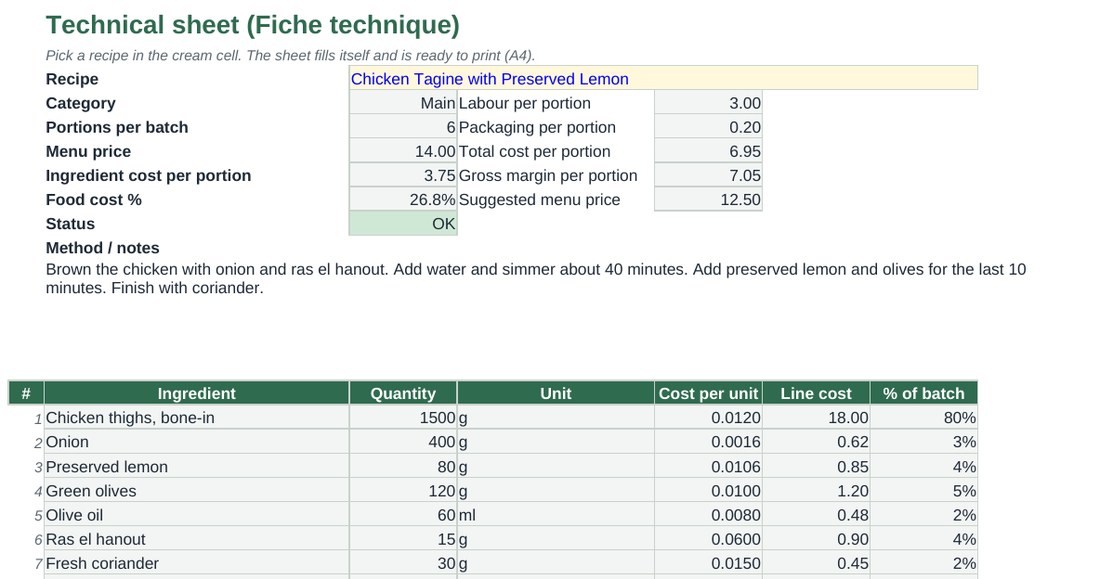
The worked example, as the sheet shows it
Chicken tagine with preserved lemon. Invented prices, real method. Cream cells are what you type, grey cells are formulas.
| Ingredient | Qty | Cost / unit | Line cost |
|---|---|---|---|
| Chicken thighs, bone-in | 1500 g | 0.0120 | 18.00 |
| Onion | 400 g | 0.0016 | 0.62 |
| Preserved lemon | 80 g | 0.0106 | 0.85 |
| Green olives | 120 g | 0.0100 | 1.20 |
| Olive oil | 60 ml | 0.0080 | 0.48 |
| Ras el hanout | 15 g | 0.0600 | 0.90 |
| Fresh coriander | 30 g | 0.0150 | 0.45 |
| Batch cost (6 portions) | 22.50 |
That is 3.75 per portion in ingredients and a 26.8% food cost at a 14.00 menu price. With 90 minutes of labour at 12.00/hour and 0.20 packaging, total cost per portion is 6.95 and the margin is 7.05.
What you get
Costs that follow your invoices
Change a pack price once. Every dish that uses it updates.
Batch preparations
Cost a marinade or dough once and reuse it across recipes.
Supplier compare
Up to three offers per ingredient, with the cheapest and the saving highlighted.
Pricing verdicts
OK, Watch or High against your own target, plus a suggested menu price.
Technical sheets
One A4 page per dish, with method and allergens, ready to print.
Dashboard
Average and sales-weighted food cost, top five costliest dishes, data checks.
Built for people who cook
I have worked in kitchens since 2013, from hotel groups to holiday centres, and I run food and beverage operations today. This workbook is the costing sheet I wanted: clear, fast to fill, and honest about what it cannot do.
Questions
Does it work in Google Sheets?
It is designed and tested for Microsoft Excel. Google Sheets may not support every feature, such as dropdown lists and the dashboard chart, so we do not promise it.
Do I have to delete the example dishes?
Yes, when you start. The manual lists exactly which cream cells to clear. Grey cells hold formulas and stay.
How many ingredients and recipes fit?
200 ingredients, 30 batch preparations, 500 recipe lines and 60 menu dishes.
Does it handle allergens?
It flags the 14 EU allergens from the marks you enter on each ingredient and prints them on the technical sheet. It only repeats what you enter, so always check against supplier labels.
Can I use it for more than one restaurant?
One purchase covers one business. Please do not resell, share or redistribute the file or the manual.
Recipe Costing & Food Cost Calculator
Excel workbook + PDF manual. Instant download.