Inventory and stock count spreadsheet for Excel
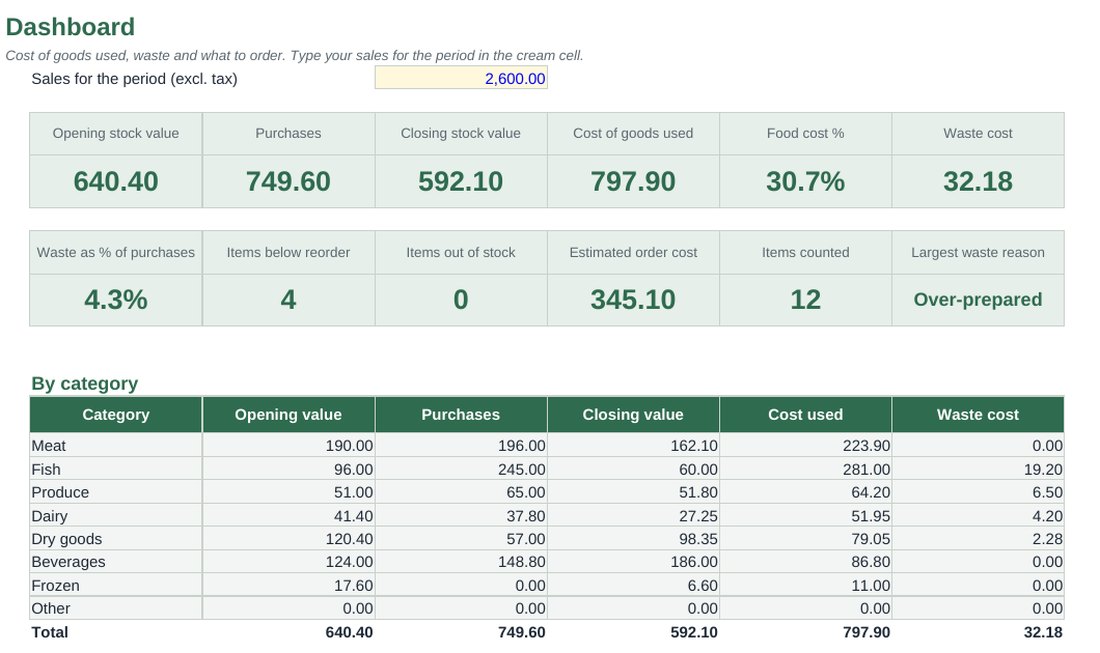
Count your stock, log deliveries and waste, and see what you really used. The workbook works out cost of goods used, food cost %, waste and the order list that brings every item back to par.
Price and release date will be announced when the Etsy shop opens.
- Format
- .xlsx workbook (Excel)
- Works with
- Microsoft Excel, desktop or 365
- Capacity
- 150 items, 400 purchase lines, 300 waste lines per period
- Language
- English
- Licence
- One business
- Status
- In final checks, price to be announced
What you get
Cost of goods used
Opening stock plus purchases minus closing stock, in money and as a percentage of your sales.
Par levels and order list
Set the level you want on the shelf. Anything below it appears on an order list, with quantities and an estimated cost.
Purchases and waste logs
Log deliveries at the price you paid and everything thrown away, with a reason. Waste is costed for you.
Value by category
Meat, fish, produce, dairy, dry goods, beverages: opening value, purchases, closing value and cost used for each.
Low and out-of-stock flags
Each item is marked OK, LOW or OUT after the count.
Dashboard
Food cost %, waste as a share of purchases, the largest waste reason and a chart by category.
Inside the workbook
Planning tool, not accounting, tax or legal advice. Example data is invented.
| Sheet | What it does |
|---|---|
| Items | Your product list with unit, cost, par level and supplier |
| Stock Count | Opening and closing counts, usage, value and order quantity |
| Purchases | Deliveries with price paid and invoice number |
| Waste | Waste log with reason and cost |
| Order List | Everything below par, built automatically |
| Dashboard | Cost of goods used, waste and value by category |
How usage is worked out
You counted 14 kg of tomatoes at the start, received 25 kg, and 14 kg are left. You used 25 kg, worth 65.00 at 2.60 per kg. Of that, 2.5 kg was logged as spoiled, so the sheet shows both the usage and the part that was waste.
Questions
How often should I count?
Weekly is the sweet spot for most kitchens, and monthly is the minimum. Count in the same order and at the same time each period so the figures can be compared.
Does it connect to my till?
No. You type your sales for the period in one cell to get food cost %. The workbook has no macros and no connections, so it works offline.
How do I start a new period?
Copy the closing counts into the opening column, clear the purchases and waste logs, and count again. The Start Here sheet explains it step by step.
While you wait
The recipe costing spreadsheet and the free food cost calculator are the first tools of the toolkit.